

Build your business app with Claude Code or Codex. Starting from a plan and a working prototype.
AI coding tools can build a real app, but only as well as they understand your business. Our self-serve package gives the AI what it needs: what to build, the screens, the rules your business follows and working code to start from, so you and your team build it one step at a time.
Starts with a short interview on our home page. No obligation to hire us.
What's in the package
Made from your plan and your prototype, after you've tried the app with your team.
The build spec
Each part of the app, the routine it takes over, and the checks you can see when it's done.
Business rules
Every rule the app follows, numbered so each one can be tested on its own as it's built.
Screen pictures
A picture of every screen in your prototype, so the finished app matches what your team tried.
The technical plan
The build order, the database, and each outside service with what it's for and what it costs.
Your prototype's code
The working prototype you and your team tried, cleaned up so the real app can be built from it.
AGENTS.md
The instructions Claude Code and Codex read, so the AI builds it with you step by step.
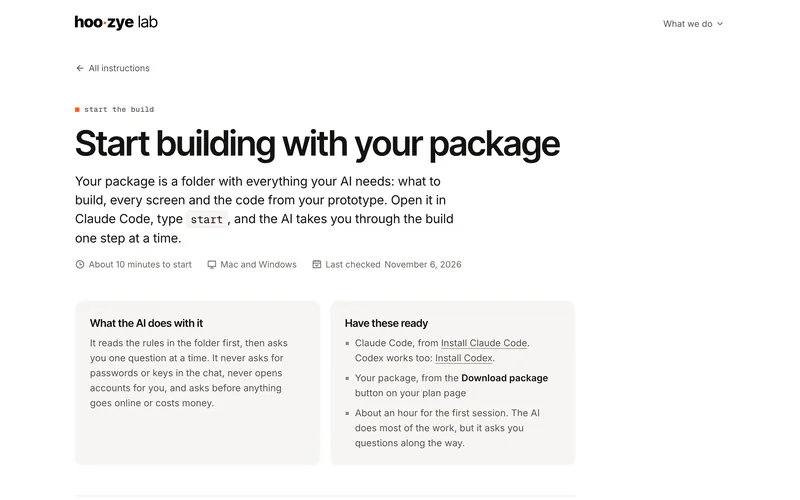
How you build with it
Four moves. The AI does the coding and tells you when it needs you.
- Step 2
Start the build
Unzip the package, open the folder in the AI tool and type
start. How to start. - Step 3
Open accounts when asked
Your app's database, hosting and email (Supabase, Vercel and Resend). The AI says when, and each one has its own page.
Every step is on our instructions pages, with each click for a Mac and for Windows.
What you'll need
- A Mac or a Windows PC.
- A paid AI plan: Claude Pro ($20 a month) for Claude Code, or a ChatGPT plan that includes Codex.
- Accounts for your app's database, hosting and email. Your package lists what each one costs, and some start free.
- Someone on your team with time each week to work through it. The AI writes the code; you answer its questions and check each step against what you can see.
Build it yourself, or have us build it
Build it yourself
- You have someone with time, and you want to own every step.
- You're fine working through problems with the AI.
- The package is yours to keep, and any developer can build from it too.
Have us build it
- You'd rather your team didn't spend its time on the build.
- It's a big build, or it runs something time-sensitive, like orders or payments.
- The $199 consultation and what you paid for the prototype come off the build price.
How to get the package
The package is made from your prototype, so you see the app working before you buy it.
- Step 1
Get your plan
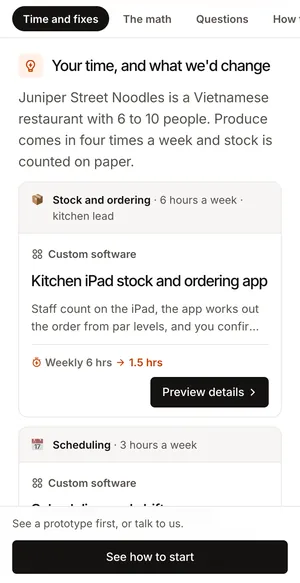
Answer the interview on our home page, and get a written plan with every fix priced.
- Step 2
Try the prototype
2% of the plan's estimated build price, at least $99. You and up to 3 people on your team try it for 7 days.
- Step 3
Get the package
5% of the plan's estimated build price, at least $149, right from the prototype.
Your planEvery fix, with its price. 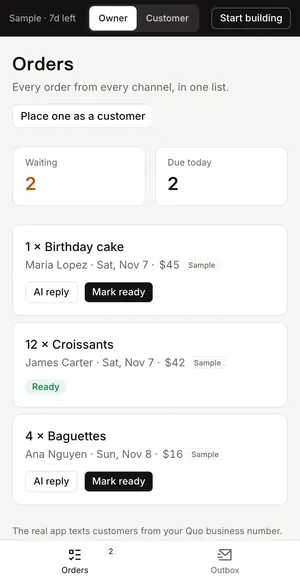
Your prototypeTry it with your team first.
Questions owners ask
Can I build a business app with Claude Code if I don't code?
Yes, with some patience. Claude Code writes the code; you answer its questions, open accounts when it asks, and check each step against what you can see. The package keeps it on track, because the AI starts from your plan and a working prototype instead of guessing.
Claude Code or Codex: which should we use?
Either works with the package. We recommend Claude Code in the Claude desktop app, the easiest way in on a Mac or a Windows PC.
What does the app cost to run once it's built?
Your package's technical plan lists each service the app uses and what it costs a month. Some start on free plans while you build.
What if we get stuck?
Every step has an instruction page, and the AI sends you to the right one. If you'd rather hand it over, the package works for any developer, or book the $199 consultation to talk about us building it.
Can a developer use the package instead?
Yes. It's written so any development team can build from it: the spec, the business rules, the open questions and the code are all plain files.
Does the package fee come off if you build it later?
No, the package is yours to keep. What comes off the build price is the $199 consultation and what you paid for the prototype.
Claude and Claude Code are trademarks of Anthropic. ChatGPT and Codex are trademarks of OpenAI. Hoozye Lab isn't affiliated with either.